.png)
Creating and signing an envelope (overview)
Updated
Here is a simplified overview for the process of creating and signing an envelope.
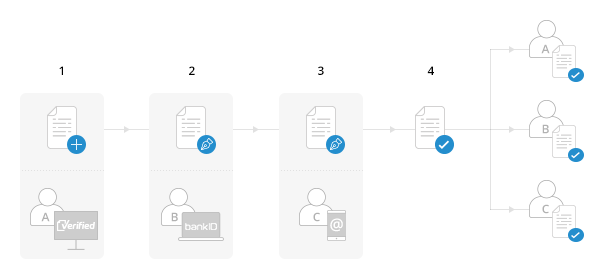
Let's say that Alex wants to send Beatrice and Claus an envelope for signing. Here is how the process would unfold:
-
Alex creates an envelope
Alex is a Verified user and he uses the Verified app to create a new envelope and adds the documents he wants signed to it. He also adds Beatrice and Claus as recipients of the envelope, and he chooses the signing methods for them (BankID for Beatrice and E-mail for Claus) and the signing order (sequential in this case).
-
Beatrice signs using BankID
Beatrice gets an email informing her that she has been requested to sign an envelope from Alex.
She opens the link, reviews the documents and decides she is ok with signing it. She presses the SIGN button and is requested to authentificate with BankID. After she does that, the documents are signed and the envelope moves to the next recipient
-
Claus signs using email
Claus gets an email with an envelope from Alex. He reviews the documents and decides he is ok with signing them. Since the signing method for him was E-mail, all he needs to do is click the SIGN button.
-
Everyone gets a signed copy
After every recipient has signed, all of them plus the sender will get a signed copy of the documents via email.
That's it!